Olivas: A Charming Handwritten Font for Your Creative Projects
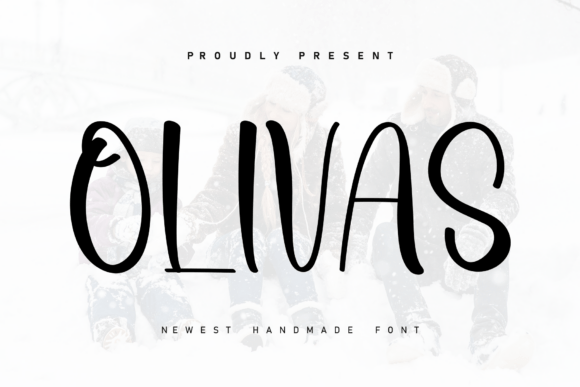
When it comes to adding a personal and inviting touch to your design projects, Olivas is a handwritten font that stands out. With its playful characters and elegant flow, Olivas can transform any design, making it feel more intimate and engaging. Whether you're a professional designer, a blogger, or a small business owner, incorporating Olivas into your creative process can enhance the overall aesthetic and emotional appeal of your work.
Understanding Olivas and Its Unique Features
Olivas is characterized by its flowing, handwritten style, which gives each character a lively and dynamic appearance. The font's design allows the letters to dance along the baseline, creating a natural and organic feel. This makes Olivas particularly suitable for projects that require a human touch, such as wedding invitations, personal blogs, or branding materials for small businesses.
Where Olivas Fits in Your Design Workflow
Integrating Olivas into your design workflow can be a seamless and rewarding experience. Here’s how you can use it effectively:
- Brainstorming and Concept Development: Use Olivas during the initial brainstorming phase to sketch out ideas and create mood boards. The handwritten style can help you visualize the tone and feel of your project, making it easier to align with your creative vision.
- Design Execution: Once you have a clear concept, incorporate Olivas into your design software. Its compatibility with popular design tools like Adobe Illustrator and Canva ensures that you can easily integrate it into your existing projects.
- Review and Feedback: Present your designs to clients or stakeholders using Olivas. The font's friendly and approachable nature can make your presentations more engaging and relatable, helping to gather constructive feedback.
- Final Touches and Publishing: Before publishing, review the consistency and readability of Olivas in your final design. Ensure that the font size and spacing are appropriate for the intended medium, whether it's print, web, or social media.
Practical Implementation Tips for Using Olivas
To get the most out of Olivas, consider the following practical tips:
- Choose the Right Context: Olivas works best in contexts where a personal and casual tone is desired. Avoid using it in formal or corporate settings where a more traditional or professional font might be more appropriate.
- Test Readability: While Olivas is visually appealing, ensure that it remains readable at various sizes. Test the font on different devices and screen sizes to confirm that it maintains its clarity and legibility.
- Combine with Complementary Fonts: Pair Olivas with other fonts that complement its style. For example, a clean sans-serif font can provide a nice contrast and balance to the handwritten look of Olivas.
- Consistency is Key: Maintain consistency in your use of Olivas throughout your project. This includes consistent font sizes, colors, and styles. Consistency helps to create a cohesive and professional look.
Interacting with Other Tools and Resources
Olivas can be seamlessly integrated with a variety of design and productivity tools, enhancing your overall workflow. Here are some ways to combine Olivas with other resources:
- Adobe Creative Suite: Import Olivas into Adobe Illustrator, Photoshop, or InDesign to use it in your graphic design projects. The font’s vector format ensures high-quality output, whether you’re working on digital or print materials.
- Canva: Add Olivas to your Canva library to use it in your social media graphics, presentations, and marketing materials. Canva’s user-friendly interface makes it easy to apply and adjust the font to suit your needs.
- Word Processing Software: Incorporate Olivas into documents created in Microsoft Word or Google Docs for a more personalized and engaging look. This can be particularly useful for creating newsletters, reports, or any other written content.
Long-Term Use and Maintenance
To ensure that Olivas continues to add value to your projects over time, consider the following maintenance tips:
- Regular Updates: Keep your font library up to date. Check for any updates or new versions of Olivas that may offer improved features or additional characters.
- Licensing Compliance: Make sure you comply with the licensing terms for Olivas. This is especially important if you plan to use the font for commercial projects or distribute it to others.
- Backup and Storage: Store your font files in a secure and accessible location. Regular backups can prevent data loss and ensure that you always have access to Olivas when needed.
Conclusion
Olivas is a versatile and charming handwritten font that can add a unique and personal touch to your design projects. By understanding its features, integrating it into your workflow, and maintaining it properly, you can leverage Olivas to create engaging and memorable designs. Whether you’re a seasoned designer or a hobbyist, Olivas offers a delightful way to bring your creative visions to life.